Teams | Collaboration | Customer Service | Project Management

The latest News and Information on Project Management, Methodologies, Productivity and Tools.

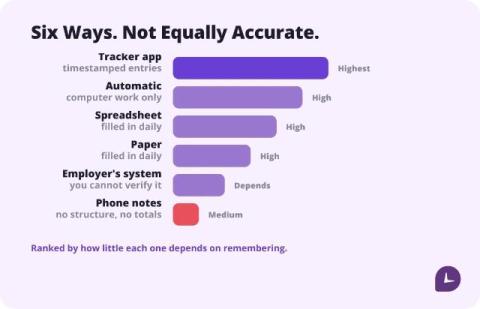
How to Keep Track of Work Hours: 6 Methods Compared

The most accurate way to keep track of work hours is to record start and end times the moment they happen, in whatever tool you will actually open. A dedicated hour tracker app loses the fewest minutes; a spreadsheet filled in daily is close behind; reconstructing the week on Friday is the least accurate method and the most common one. Pick by what you will do every day, not by feature count.

Free Work Hour Trackers: 6 Tools That Are Actually Free

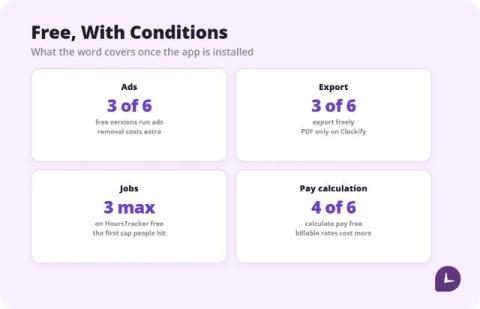
Six free hour trackers, compared from vendor pricing pages and current store listings. The honest summary: several are free because they show ads, most lock pay calculation or export behind a paid tier, and for one person a one-time unlock often beats a subscription within a few months. Pick by which limit you can live with, not by the word free.

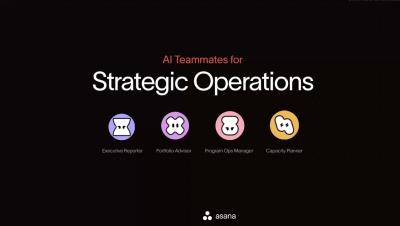
Asana AI Teammates for Strategic Operations

Meet the AI Teammates built for Strategic Operations in Asana. See how the Executive Reporter turns account data into leadership-ready updates, the Portfolio Advisor flags risks before they become problems, the Program Ops Manager keeps PMO intake moving, and the Capacity Planner balances your team's workload — all learning and improving as they collaborate with your team. Key moments.

Best Apps to Track Work Hours in 2026: Compared for Hourly Workers

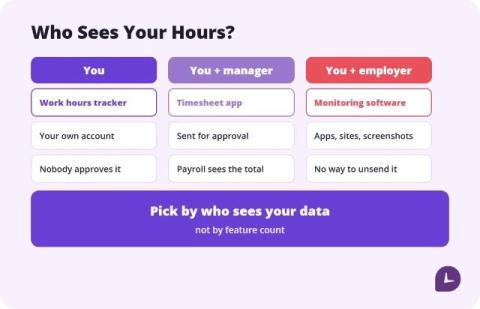
HoursTracker and Work Log are the best apps to track work hours for most hourly employees, because both calculate pay, handle overtime, and work without a manager account. Toggl Track is the best free option if you want a clean cross-platform timer without ads. Clockify is the best choice when your whole team needs to log hours. Pick by who sees your data, not by feature count. Most “best time tracking app” lists are written for the person who signs the invoice.

10 best enterprise project management and PSA software for 2026

I've spent years watching teams outgrow their PM tools. Visibility disappeared the moment headcount crossed 50. According to Teamwork.com's 6 Strategic Shifts for 2026 report, 92% of business leaders say their current tech falls short on data management and reporting. Half believe they're losing revenue due to those inefficiencies. That stat didn't surprise me. What surprised me was how many teams accept it as normal.

WTF Is an MCP Server? (And Why You Should Care)

So, MCP servers. You’ve probably heard about them by now. Maybe someone mentioned them in a meeting, you read about them on LinkedIn, or one popped up in a product update from one of the tools you use at work. And maybe you nodded along like you knew what it meant. No judgment. We’ve all done it. (I’ve done it more than I’d like to admit.) But the problem is, most explanations of MCP servers I’ve read are written by developers, for developers.

11 ClickUp alternatives, sorted by what you'd still have to build

ClickUp can be configured to do almost anything, and for a services team that's the catch. It tracks tasks, not money, so rate fields, budget formulas and utilization views all have to be built and maintained by someone on your team. If you're comparing ClickUp alternatives, that build cost is the number to measure first. I work at Teamwork.com. Before that, I spent nine years in agencies, where the numbers I trusted least were always the ones that depended on someone remembering to fill in a field.

Outgrown Trello? 8 alternatives that retire the spreadsheet beside your board

For most of my nine years in agencies, moving tasks along was the easy part. The hard part lived in spreadsheets: who was free next week, which hours never got logged, and whether a retainer still paid its way. I had a basic timer and a lot of tabs, and the tabs were always a few days behind. I work at Teamwork.com now, and I see the same thing in teams shopping for Trello alternatives. Trello is still a strong board, and Premium adds Timeline, Table, Calendar, Dashboard, and Map views.

AI Resource Management for Operations Leaders

Resource management is mostly admin. Checking who’s overbooked, finding cover when someone’s off, or moving every date when a client slips. AI can now take on a lot of that work, from answering questions about your schedule to actually making the changes. This guide covers what AI in resource management usually handles today, and the data it needs before you can trust it to reschedule your people.