

Teams | Collaboration | Customer Service | Project Management

How Healthcare Organizations Can Protect Patient Information Through Secure Messaging

Healthcare organizations handle large volumes of sensitive information every day, including patient records, diagnostic reports, prescriptions, treatment plans, and medical histories. Doctors, nurses, administrative employees, laboratory technicians, and other healthcare professionals regularly exchange this information to coordinate patient care and manage daily operations.

AI Cast: So what's Atlassian's Jira Planner's real role?

This video explains why Jira Planner is so important and how it will soon help teams plan faster and with higher quality. It describes moving from brainstorming and documents into Jira where Planner asks questions to clarify intent, drafts reviewable PRD-like requirements and technical plans, and even creates architecture diagrams by using the team’s historical work and standards. It then connects Planner outputs to AI agents, framing Jira items as high-quality prompts that can flow into a Claude-driven workflow.

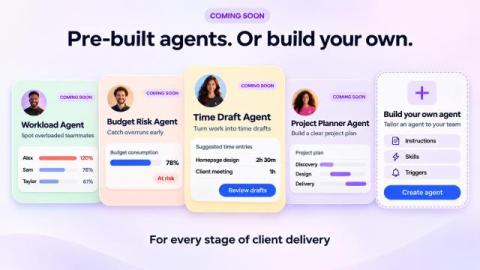
Coming soon: AI agents that do the work, not just answer questions

Every client project comes with work around the work. Chasing missing time on a Friday afternoon. Pulling numbers together for a status report. Checking who has too much on next week. Moving dates when a task slips. None of it is hard. It just takes time, and it pulls your best people away from clients. AI agents are coming soon to Teamwork.com to take that work off your plate. Be one of the first to put AI agents to work. Join the waitlist.

Zulip 13.0: Organized chat for distributed teams

We’re excited to announce the release of Zulip Server 13.0, containing numerous new features and bug fixes. Almost 2,200 new commits have been merged across the project since the 12.0 release in April 2026. Our team put significant focus on improving navigation between conversations, and searching for topics and messages in 13.0.

Time Tracking for Designers: How to Estimate Creative Work

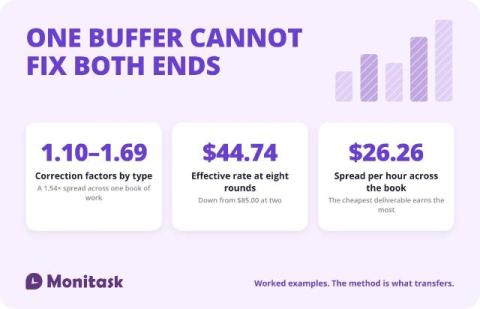
Designers track time to fix estimates, not to prove hours. The method is a ratio: record actual hours against the estimate for each type of deliverable, and use that type’s ratio to correct the next quote. A single overall buffer does not work, because the gap between estimate and actual varies by roughly 1.54× across deliverable types. The figures below are worked examples; the method is what transfers.

3+1 Miro Template Features You Probably Did Not Know About

Most Miro users only scratch the surface of what templates can do. In this video, we cover four hidden template features: saving your own custom templates for team reuse, AI-accelerated templates that turn hours of work into minutes, Blueprints that bundle complete workflows into a single Space, and how to combine any template with Miro AI to generate presentations, images, and entire boards from scratch.

How to Manage Shadow IT: A Step-by-Step Guide for IT and Security Leaders

To manage shadow IT, start by creating visibility into the tools people use, then talk to the teams using them to understand why. Set priorities by risk, decide which tools to approve, replace or retire, and give employees governed tools that are as easy to use as the apps they chose themselves. Messaging and crisis communication need a plan of their own. Shadow IT is rarely a sign of bad intent.

The Role of Communication Transparency in Building Employee Trust

Communication transparency builds employee trust by giving people the information that affects their work, their pay, and their health before they have to ask for it. Employees may judge an employer less by its all-hands messages than by whether it shares difficult information when it matters. Safety information is the hardest version of that test. When an employer holds back a workplace hazard, the damage to trust can surface decades later, as the history of asbestos exposure illustrates.

Workstatus Sprint Updates | Timesheets, Shift Management, Project Insights & More

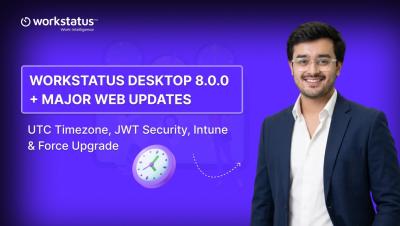
Discover the latest updates in Workstatus! This sprint brings new improvements across timesheets, shift management, project visibility, resource planning, and task management to help teams manage work more efficiently. Here's what's new in Workstatus: Members & Timezone Settings: Manage individual member timezones with greater flexibility. Timesheet Enhancements: View timesheets, check working hours, and review activity classifications.

How to Add Members and Manage them from Admin Settings | Flowace

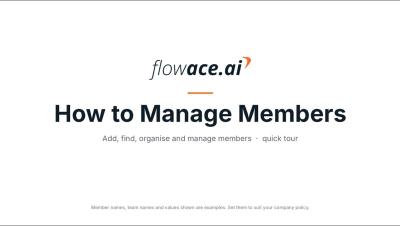
Learn how to add, find and manage members in Flowace: add one member or many, filter the list, act on several members at once, and see who reports to whom. The Members page lists everyone in your company in four tabs. Add people one by one or in bulk, edit several members at once, and use the hierarchy chart to follow the reporting chain. In this video: Chapters: Example setup used in this video: Member names, team names and values shown in this video are examples. Set them to suit your company policy.