

|
By Abhay Jain
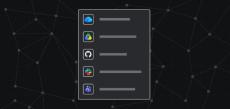
Maya runs IT for Beaconstone Financial, a fintech company with 2,000 employees. Her engineering teams work in Jira and GitHub. Sales lives in Salesforce. Most decisions happen in Slack threads, Google Docs, and SharePoint folders that nobody can find six months later. Leadership wants Rovo to answer questions across all of it. Her head of sales has asked for account briefs that pull in the latest Salesforce opportunity data and last week’s customer call.

|
By Hersh Iyer
In 2025, companies spent a collective $581 billion on AI. The results were underwhelming: according to a study by MIT, 95% of Enterprise AI pilots showed zero impact on organization’s bottom lines. In short, the vast majority of AI pilots are unsuccessful. The reflex is to blame the models. The evidence points somewhere easier to control: context. Every answer AI produces is assembled from a context packet—the material used to respond to the presented prompt.

|
By Jamil Valliani
Over the last two decades, millions of teams have run their work on Atlassian, writing code, shipping products, and supporting customers across billions of workflows. Our platform is also where they make the hard calls, prioritizing which features to build, deciding which customer problems to chase, and choosing where to invest their resources.
|
By Alan Braun
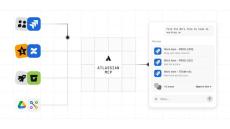
When we delivered Atlassian MCP a little under a year ago, the idea was simple: let the AI tools your teams already use – Claude, ChatGPT, Cursor – reach the work that lives in Atlassian. The response was immediate. Now, we’re seeing more than 15M calls a day as it’s become the first thing teams reach for when they want to connect AI to their work. But teams have made it clear they want more. More products, more context, and more of the whole job done.

|
By Matthew Canham
Teams across the industry are sprinting to reinvent their software development processes with agentic AI. Yet, navigating the fast-changing landscape of tools and opinions can be daunting for even the most AI-forward organizations. This guide shares Atlassian’s approach and best practices, informed by our own internal AI SDLC transformation and collaborative learnings from top engineering organizations.

|
By Tamar Yehoshua
What context really means for agents, why models aren’t enough, and how to engineer context your teams can trust. Over the coming weeks we’ll be sharing more about context in this content series — including how to engineer context as a product, what a context graph actually is, and what it takes to build one that agents can trust. You can also learn more about how Atlassian is harnessing context in our latest report, Leading with Context.

|
By Dr. Molly Sands
Brainstorming at the start of a project is hard. Who hasn’t stared at a blank document, wondering how to begin? Reaching for AI can feel like an easy way to get started, especially at first. But at Atlassian, we believe that AI should amplify human judgment, not replace it. The Teamwork Lab wanted to investigate when it’s most effective to introduce AI into the brainstorming process. Does the timing of AI introduction affect a team’s creativity?

|
By Libby Varcoe -
AI can sound confident about almost anything. The challenge is making sure it’s right. At Atlassian, Content Technologists are building the systems, standards, and structures that help AI deliver better outputs, removing the burden from our customers of knowing what information to trust.
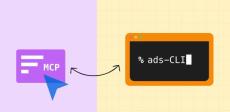
Earlier this year, we wrote about turning Atlassian Design System guidance into structured content that AI agents can actually use. Since then, agents have reached that content through our MCP server tools and an agent skill. We recently added a third distribution method: a command-line tool. The first question from our own engineers was a fair one: Why ship a CLI when you already have an MCP server?

|
By Whitney Nicholes
Atlassian and Gamma are now deeply connected, so your work, and the context behind it, moves with you from plan to presentation. AI is supposed to understand your work. But it can only see what it can reach, and right now, your work is scattered. Updates live in slide decks, details hide in Jira tickets, decisions are buried in Confluence. We expect AI to “just know” how it all connects, then wonder why the output feels generic.
|
By Atlassian
Individual capacity planning in Jira is a native view that connects team member bandwidth directly to live work items, epics, and initiatives—eliminating the need for disconnected planning spreadsheets. In this video, we cover how to set up individual capacity planning, import existing spreadsheets with Atlassian Rovo, track non-project time like PTO and KTLO, prevent overallocation across spaces, and rebalance resources using AI natural language commands.

|
By Atlassian
Formula fields are a Jira custom field type that runs real-time calculations directly on work items using values from other fields. In this video, learn how to create formula fields in Jira, calculate dynamic metrics like budget variance and ROI, use Atlassian Rovo to generate formulas with natural language, and set up conditional formatting to highlight at-risk work. IN THIS VIDEO: CHAPTERS: RELATED RESOURCES.
|
By Atlassian
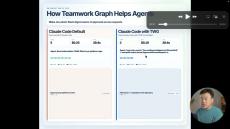
This is video is part of the Teamwork Graph benchmarking series being launched by TWG PM/PMM. It is in support of the soon to be released Teamwork Graph benchmark report blog. About Atlassian: Behind every great human achievement, there is a team. From medicine and space travel to disaster response and pizza deliveries, we help teams all over the planet advance humanity through the power of software. Our mission is to help unleash the potential of every team.
|
By Atlassian
Yes, Jira works inside Microsoft Teams. The Jira Cloud for Microsoft Teams app brings project management into your conversations, and it just got smarter. Over a million users already rely on the Jira for Microsoft Teams integration for notifications, work item previews, and quick actions. Now Jira understands natural language, so you can create, update, and assign work without ever leaving your Teams chat.
|
By Atlassian
Already using GitHub Copilot? Now you can drive it directly from Jira. The Copilot integration reads your issue summary, description, and acceptance criteria, and passes that context straight to Copilot to work on your connected GitHub repo. The result: a pull request raised in GitHub, linked back to your Jira issue, ready for review. Watch to see how to connect your planning and your code in one easy flow.

|
By Atlassian
Starting a new project with AI agents? The Agentic Engineering template in Jira gets your whole team set up in one go with coding agents (Jira Coding Agent, Claude, Copilot, Cursor), Teamwork Graph CLI, automations, intelligent triage, and more. Follow four guided setup tasks and you'll have agents wired into your workflow before your first standup. Watch to see how to go from a blank project to a fully agentic engineering setup in minutes.
|
By Atlassian
What if every incoming issue could trigger Cursor Agent automatically? With agent automations in Jira, you set a condition, like a specific summary prefix for security issues or improvement requests, and when a matching ticket lands, your chosen coding agent (Jira Coding Agent, Claude, or Cursor) picks it up and gets to work. No manual triage, no delay. Set it once, and your agents do the rest. Watch to see how to wire up agent automations in Jira step by step.

|
By Atlassian
“Let’s talk” just cost someone their entire afternoon. Confetti says the answer was a Loom all along.

|
By Atlassian
What is AI really doing for the enterprise — and what's just hype? At the SAFe Summit 2026 in Amsterdam, Renaud Granier (Accenture), Zach Brown (Atlassian), and Saahil Panikar (Atlas Revolutions) sit down for an unfiltered conversation about the state of AI in business today. From the difference between prediction and reasoning, to the growing problem of AI sprawl, to why change management might matter more than the technology itself — this is a must-watch for anyone trying to make sense of AI in their organization.
|
By Atlassian
Jira is the new system for AI-native software development. Turn ideas into agent-ready technical specs with Jira Planner. Assign work to any agent, including Claude, Cursor, GitHub Copilot, Jira Coding Agent, and more. Track, review, and iterate on agent output in one place. Scale agentic work with by automatically assigning tasks to coding agents.
- October 2026 (5)
- September 2026 (13)
- August 2026 (13)
- July 2026 (23)
- June 2026 (19)
- May 2026 (19)
- April 2026 (20)
- March 2026 (9)
- February 2026 (9)
- January 2026 (12)
- December 2025 (10)
- November 2025 (22)
- October 2025 (23)
- September 2025 (17)
- August 2025 (17)
- July 2025 (10)
- June 2025 (9)
- May 2025 (12)
- April 2025 (20)
- March 2025 (11)
- February 2025 (7)
- January 2025 (12)
- December 2024 (9)
- November 2024 (11)
- October 2024 (13)
- September 2024 (7)
- August 2024 (14)
- July 2024 (10)
- June 2024 (12)
- May 2024 (16)
- April 2024 (5)
- March 2024 (7)
- February 2024 (20)
- January 2024 (13)
- December 2023 (9)
- November 2023 (12)
- October 2023 (11)
- September 2023 (11)
- August 2023 (15)
- July 2023 (9)
- June 2023 (15)
- May 2023 (10)
- April 2023 (13)
- March 2023 (10)
- February 2023 (6)
- January 2023 (10)
- December 2022 (12)
- November 2022 (6)
- October 2022 (9)
- September 2022 (12)
- August 2022 (4)
- July 2022 (11)
- June 2022 (10)
- May 2022 (13)
- April 2022 (9)
- March 2022 (7)
- February 2022 (10)
- January 2022 (8)
- December 2021 (10)
- November 2021 (5)
- October 2021 (17)
- September 2021 (12)
- August 2021 (9)
- July 2021 (15)
- June 2021 (18)
- May 2021 (18)
- April 2021 (16)
- March 2021 (25)
- February 2021 (11)
- January 2021 (8)
- December 2020 (8)
- November 2020 (11)
- October 2020 (9)
- September 2020 (8)
- August 2020 (7)
- July 2020 (6)
- June 2020 (6)
- May 2020 (9)
- April 2020 (9)
- March 2020 (11)
- February 2020 (5)
- January 2020 (7)
- November 2019 (2)
- September 2019 (1)
- January 2019 (1)
- November 2018 (1)
Tools for teams, from startup to enterprise. Atlassian provides the tools to help every team unleash their full potential.
Atlassian is a leading provider of collaboration, development, and issue tracking software for teams. With over 100,000 global customers (including 85 of the Fortune 100), we’re advancing the power of collaboration with products including Jira, Jira Service Desk, Jira Ops, Confluence, Hipchat, Bitbucket, Trello, OpsGenie, and more. Driven by honest values, an amazing culture, and consistent revenue growth, we’re out to unleash the potential of every team.