Teams | Collaboration | Customer Service | Project Management

OneDesk's New Financials Application In-Depth

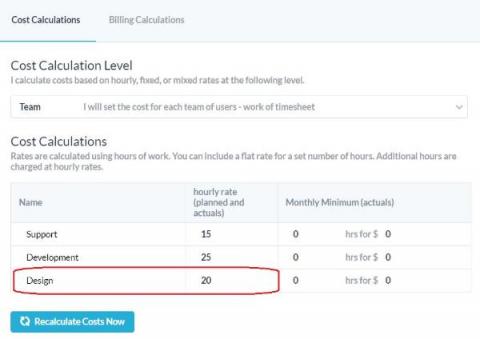
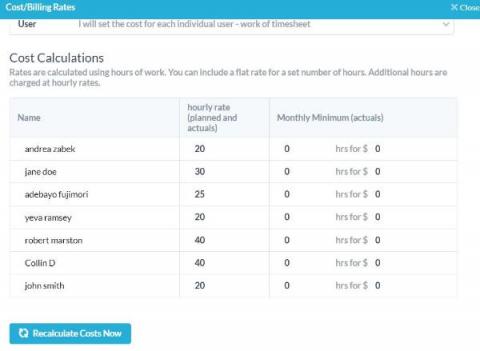
The new Financials application was released with OneDesk’s December 2021 update and is currently in Beta. This application is for organizations who wish to handle finances surrounding their projects, tickets, and tasks within OneDesk. The Financials application can showcase features of your items such as planned and actual cost, work, forecast revenue/expenditure, and more. Additionally, the Financials application supports cost and billing calculations.

OneDesk - Archiving & Auto-Archiving Tickets (or Tasks)

Learn about archiving your tickets, tasks and projects in OneDesk OneDesk combines Help Desk & Project Management software into a single application. OneDesk also includes customer-facing applications: real-time chat, customizable webforms, and a customer portal. These integrated applications allow you to serve your customers while conveniently working on your projects in one platform.
OneDesk - Configuring Forms

Setup internal and external forms. OneDesk combines Help Desk & Project Management software into a single application. OneDesk also includes customer-facing applications: real-time chat, customizable webforms, and a customer portal. These integrated applications allow you to serve your customers while conveniently working on your projects in one platform.
OneDesk - Importing Projects

Learn how to easily migrate to OneDesk by importing your projects. OneDesk combines Help Desk & Project Management software into a single application. OneDesk also includes customer-facing applications: real-time chat, customizable webforms, and a customer portal. These integrated applications allow you to serve your customers while conveniently working on your projects in one platform.
OneDesk - Importing Customers

Learn how to import customer profiles into OneDesk OneDesk combines Help Desk & Project Management software into a single application. OneDesk also includes customer-facing applications: real-time chat, customizable webforms, and a customer portal. These integrated applications allow you to serve your customers while conveniently working on your projects in one platform.
OneDesk - Importing Portfolios

Learn how to import your Portfolios into OneDesk OneDesk combines Help Desk & Project Management software into a single application. OneDesk also includes customer-facing applications: real-time chat, customizable webforms, and a customer portal. These integrated applications allow you to serve your customers while conveniently working on your projects in one platform.
OneDesk - Importing Users

Learn how to import user information into OneDesk OneDesk combines Help Desk & Project Management software into a single application. OneDesk also includes customer-facing applications: real-time chat, customizable webforms, and a customer portal. These integrated applications allow you to serve your customers while conveniently working on your projects in one platform.

OneDesk - Importing Tickets or Tasks

Learn how to import existing tickets or tasks into OneDesk OneDesk combines Help Desk & Project Management software into a single application. OneDesk also includes customer-facing applications: real-time chat, customizable webforms, and a customer portal. These integrated applications allow you to serve your customers while conveniently working on your projects in one platform.