Teams | Collaboration | Customer Service | Project Management

To-the-Minute Scheduling on Tasks and Projects

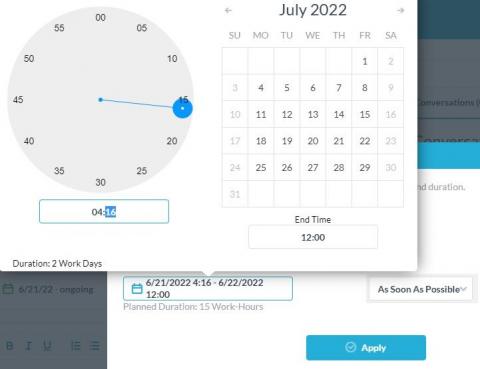
Scheduling is a key aspect of project management. Effective project management scheduling includes more than just setting the project due date. Rather, for effective planning, a project manager should ensure to define the task and project activities, estimate effort and duration, determine dependencies and monitor everything in real-time. OneDesk offers many options and helpful tools for scheduling and monitoring the progress of your tasks and projects.

Subtasks Rollup Settings and the Subtask Tree View

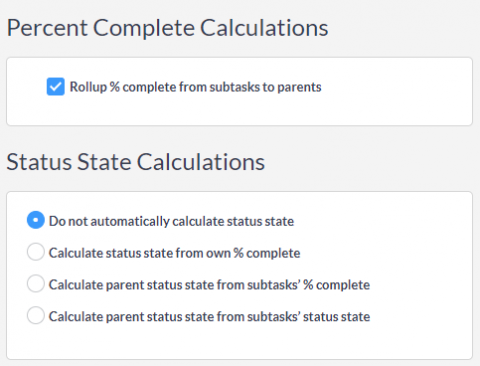
Subtasks are a popular project management and helpdesk feature in OneDesk. Subtasks are great for breaking down complicated tasks into smaller ones. One stand-out aspect of subtasks in OneDesk is the fact that subtask are full-featured tasks. In many other project management applications, subtasks are ‘weak’ tasks with limited features. With OneDesk, subtasks have the same powerful functions of a regular task.

OneDesk - Project Roles and User Permissions

OneDesk has user-level permissions, as well as project and team roles. Learn about the different user permissions, and how to set user permissions. OneDesk combines Help Desk & Project Management software into a single application. OneDesk also includes customer-facing applications: real-time chat, customizable webforms, and a customer portal. These integrated applications allow you to serve your customers while conveniently working on your projects in one platform.

OneDesk - Getting Started: Tickets Overview

An introduction of how to create and use tickets in OneDesk. Highlights the difference between tickets and tasks and how to use the ticket detail panel. OneDesk combines Help Desk & Project Management software into a single application. OneDesk also includes customer-facing applications: real-time chat, customizable webforms, and a customer portal. These integrated applications allow you to serve your customers while conveniently working on your projects in one platform.

OneDesk - Getting Started: Tasks Overview

An overview of what tasks are for, how tasks are created, and the task detail panel. OneDesk combines Help Desk & Project Management software into a single application. OneDesk also includes customer-facing applications: real-time chat, customizable webforms, and a customer portal. These integrated applications allow you to serve your customers while conveniently working on your projects in one platform.

OneDesk - Getting Started: Service Level Agreements

An overview of using and creating service level agreements (SLAs) in OneDesk. OneDesk combines Help Desk & Project Management software into a single application. OneDesk also includes customer-facing applications: real-time chat, customizable webforms, and a customer portal. These integrated applications allow you to serve your customers while conveniently working on your projects in one platform.

OneDesk - Getting Started: Financials

The Financials application allows you to plan, track, and monitor the finances surrounding your tickets, tasks, and projects. Learn the basics of the Financials application. OneDesk combines Help Desk & Project Management software into a single application. OneDesk also includes customer-facing applications: real-time chat, customizable webforms, and a customer portal. These integrated applications allow you to serve your customers while conveniently working on your projects in one platform.

Managing Work and Customer Support with Remote Work Software

More and more teams are choosing to opt for working remotely. While remote work has many benefits, there are also challenges. One of the biggest challenges is facilitating team collaboration. While video calls and meetings can help, it is important for your team to know dynamically what others are working on or how they are progressing on tasks. Similarly, no matter where you are, monitoring and managing customer requests and responding efficiently is crucial.

OneDesk - Integrating with Dropbox

Dropbox files to tickets and tasks tickets and tasks. With OneDesk and Dropbox, your cloud storage is directly integrated with your helpdesk and project management software. OneDesk combines Help Desk & Project Management software into a single application. OneDesk also includes customer-facing applications: real-time chat, customizable webforms, and a customer portal. These integrated applications allow you to serve your customers while conveniently working on your projects in one platform.