Teams | Collaboration | Customer Service | Project Management

How a Website Translation Company uses OneDesk for their sophisticated ticketing system and internal project management efforts

For companies that have very established workflows for their ticket and project management, it can be difficult finding the right software to properly reflect them. In certain instances where the workflows are a little less traditional, it can be even more of a challenge to ensure the right customizations are possible. When a translation company came to us with some specific use cases in mind, we knew that this would be a great test of OneDesk’s abilities.

OneDesk - Get Started: Archiving Tickets & Tasks

In OneDesk, you can archive tickets and tasks manually or with automation. 00:00 Archiving Manually1:48 Archiving Automatically OneDesk combines Help Desk & Project Management software into a single application. OneDesk also includes customer-facing applications: real-time chat, customizable webforms, and a customer portal. These integrated applications allow you to serve your customers while conveniently working on your projects in one platform.

OneDesk - Getting Started: Auto-Triage Customer Requests

OneDesk helps you to auto-triage incoming customer requests. OneDesk combines Help Desk & Project Management software into a single application. OneDesk also includes customer-facing applications: real-time chat, customizable webforms, and a customer portal. These integrated applications allow you to serve your customers while conveniently working on your projects in one platform.

OneDesk - Getting Started: Linking Items

OneDesk lets you create links between tickets and tasks. OneDesk combines Help Desk & Project Management software into a single application. OneDesk also includes customer-facing applications: real-time chat, customizable webforms, and a customer portal. These integrated applications allow you to serve your customers while conveniently working on your projects in one platform.

OneDesk - Getting Started: Task Dependencies

OneDesk lets you establish task dependencies with successor and predecessor links. OneDesk combines Help Desk & Project Management software into a single application. OneDesk also includes customer-facing applications: real-time chat, customizable webforms, and a customer portal. These integrated applications allow you to serve your customers while conveniently working on your projects in one platform.

Task Dependencies: Predecessor & Successor

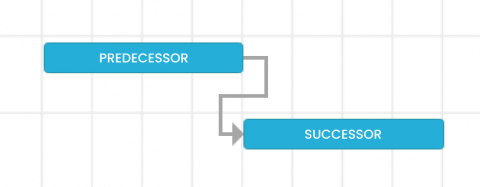
You can establish task dependencies with successor and predecessor links. Dependencies define relationships among tasks that determine their order. Predecessors identify tasks that must be completed before their successor task can be started. Using predecessor and successor relationships can help you improve project scheduling and allows you to determine how to shorten the critical path of the projects you are working on.

How a Business Intelligence Firm uses OneDesk to manage internal requests from multiple subsidiaries

Services and requests are two concepts that go closely hand in hand. Even for internal requests, once a service is requested, there is a certain level of agreement that must happen between the two parties involved. This is often handled via terms and contracts, but these can be easy to mismanage or lose sight of. In most software used for managing work, these aspects are not captured or part of the workflow.

OneDesk - Getting Started: Analytics

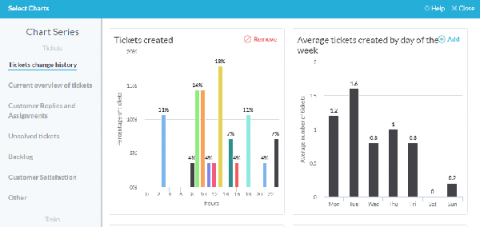
OneDesk offers a dedicated Analytics app that allows you to monitor data about your OneDesk. OneDesk combines Help Desk & Project Management software into a single application. OneDesk also includes customer-facing applications: real-time chat, customizable webforms, and a customer portal. These integrated applications allow you to serve your customers while conveniently working on your projects in one platform.