Teams | Collaboration | Customer Service | Project Management

How a MSP uses OneDesk to optimize their customer support

For managed service providers (MSP), customer support is absolutely core to their business. Where the various services provided may be the main customer-facing offering, without a supporting team to attend to client needs and answer questions, an MSP is sure to face challenges retaining clients. Empowering your customer support team only further serves your business, and one simple way to do that is by introducing a helpdesk and ticketing system.

New Features - June 2021 - Analytics

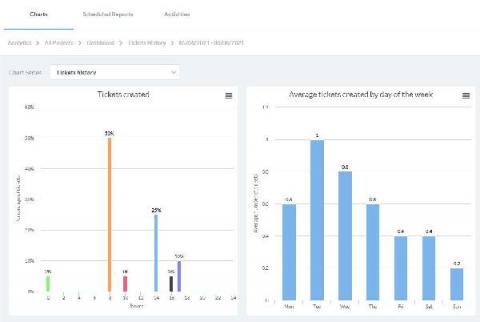
The June 2021 Release of OneDesk introduces a new App (in Beta) to centralize statistics about your tickets, tasks, and projects. We call this new app ‘Analytics’. Located under the ‘More Applications’ icon in the lower-left corner, the Analytics app brings together Reports and Activities, and introduces a new section called ‘Charts’. Here are some highlights of the new Charts app.

OneDesk - Getting Started: Reporting

OneDesk lets you create, save, and schedule custom reports about your work information in OneDesk. Use report creation to get updates about the information you care about sent directly to your inbox. OneDesk combines Help Desk & Project Management software into a single application. OneDesk also includes customer-facing applications: real-time chat, customizable webforms, and a customer portal. These integrated applications allow you to serve your customers while conveniently working on your projects in one platform.

OneDesk - Getting Started: Customer Surveys

In OneDesk, you can gather customer feedback and satisfaction scores using customer satisfaction surveys. The scores you collect can be used to determine a customer support agent’s capability, helping team managers make decisions to improve their helpdesk services. OneDesk combines Help Desk & Project Management software into a single application. OneDesk also includes customer-facing applications: real-time chat, customizable webforms, and a customer portal. These integrated applications allow you to serve your customers while conveniently working on your projects in one platform.
OneDesk - Getting Started: Agent Management

Manage your team more effectively with OneDesk’s team management capabilities. Help your team increase productivity and provide a higher quality of service for your customers. OneDesk combines Help Desk & Project Management software into a single application. OneDesk also includes customer-facing applications: real-time chat, customizable webforms, and a customer portal. These integrated applications allow you to serve your customers while conveniently working on your projects in one platform.
OneDesk - Getting Started: Merging Items

OneDesk lets you merge and link tickets and tasks (items) for quick access and easier resolution. OneDesk combines Help Desk & Project Management software into a single application. OneDesk also includes customer-facing applications: real-time chat, customizable webforms, and a customer portal. These integrated applications allow you to serve your customers while conveniently working on your projects in one platform.
OneDesk - Getting Started: Creating & Sharing Work Views

OneDesk lets you choose how your data is displayed. This lets you decide how your work is represented to allow you to better understand and manage the information. OneDesk combines Help Desk & Project Management software into a single application. OneDesk also includes customer-facing applications: real-time chat, customizable webforms, and a customer portal. These integrated applications allow you to serve your customers while conveniently working on your projects in one platform.
OneDesk - Getting Started: Sharing with Users & Teams

OneDesk lets you share projects with your users and teams and assign roles at the team level. OneDesk combines Help Desk & Project Management software into a single application. OneDesk also includes customer-facing applications: real-time chat, customizable webforms, and a customer portal. These integrated applications allow you to serve your customers while conveniently working on your projects in one platform.
OneDesk - Getting Started: Timesheets & Timers

Use timesheets and timers to keep track of all logged hours of work. You can customize the information collected on timesheets and make certain fields required. OneDesk combines Help Desk & Project Management software into a single application. OneDesk also includes customer-facing applications: real-time chat, customizable webforms, and a customer portal. These integrated applications allow you to serve your customers while conveniently working on your projects in one platform.
OneDesk - Getting Started: Item Creation & Configuration

OneDesk allows you to enable and configure multiple item types. They can have different icons, colors, lifecycle statuses, and creation emails. Create and add custom fields to the ticket or task’s individual creation forms. OneDesk combines Help Desk & Project Management software into a single application. OneDesk also includes customer-facing applications: real-time chat, customizable webforms, and a customer portal. These integrated applications allow you to serve your customers while conveniently working on your projects in one platform.