Teams | Collaboration | Customer Service | Project Management

OneDesk - Getting Started: Subtasks

OneDesk lets you divide complex tickets and tasks into smaller, manageable subtasks. The created subtasks can be assigned individually and managed independently. OneDesk combines Help Desk & Project Management software into a single application. OneDesk also includes customer-facing applications: real-time chat, customizable webforms, and a customer portal. These integrated applications allow you to serve your customers while conveniently working on your projects in one platform.
OneDesk - Getting Started: Macros

OneDesk lets you bulk edit tickets, tasks, and projects with macros. Create macros then save or share them with your team to use. Free up your time with the ability to take multiple actions at once. OneDesk combines Help Desk & Project Management software into a single application. OneDesk also includes customer-facing applications: real-time chat, customizable webforms, and a customer portal. These integrated applications allow you to serve your customers while conveniently working on your projects in one platform.

OneDesk - Getting Started: Agent Management

Manage your team more effectively with OneDesk’s team management capabilities. Help your team increase productivity and provide a higher quality of service for your customers. OneDesk combines Help Desk & Project Management software into a single application. OneDesk also includes customer-facing applications: real-time chat, customizable webforms, and a customer portal. These integrated applications allow you to serve your customers while conveniently working on your projects in one platform.
How a Tree Trimming Company uses OneDesk to manage their operations

Although large companies generally gain stability in surviving growing pains, they face different challenges in managing their work across a large workforce. It is normal to see such companies divided into different departments, which then are made up of smaller teams. These smaller teams may each have their own lead or manager or, as is often the case, they may share leads or managers with other teams.

Smart Rescheduling in OneDesk

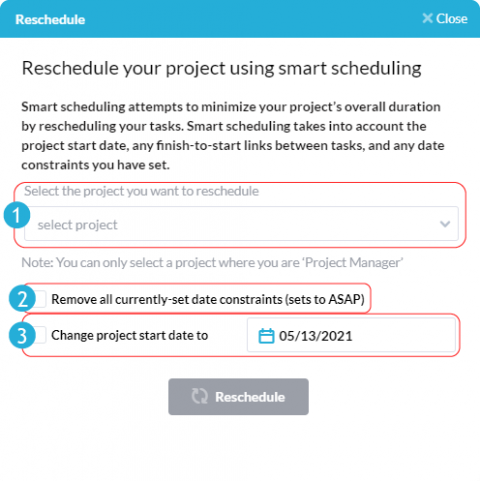
OneDesk makes optimizing your project schedule easy with ‘smart rescheduling’. In only a few clicks, this powerful tool can optimize the work schedule of your projects, allowing you to save time and reduce the overall duration of your projects. Smart rescheduling will take into account the project’s start date, any finish-to-start links between tasks, and any date constraints you have set, unless you specify otherwise.