Push Notifications, What's New?
Check out What's New with Rocket.Chat Push Notifications


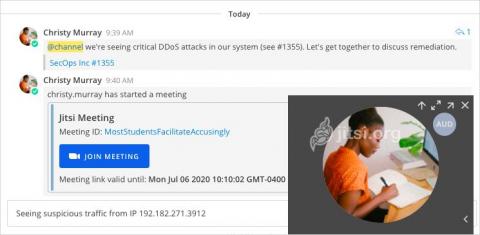
Mattermost and Jitsi—open source, self-hosted alternatives to Slack and Zoom—now integrate! With the Mattermost Jitsi plugin, Mattermost users can now instantly launch secure Jitsi voice, video and screen-sharing calls, either on-prem with the self-hosted Jitsi software or via the cloud with Jitsi Meet.
Communication is the key to any healthy relationship. You wouldn’t expect your loved ones to read your mind, would you? (Ahem..at least not all of the time) So why should your customers and employees have to do all of the guesswork? The single biggest mistake most companies make is the failure to communicate, losing their customers’ interest, and sometimes even their trust. And without internal communication with their team, businesses would simply cease to exist.
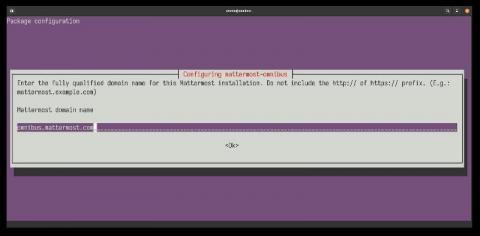
Some time ago, a group of Mattermost contributors sat down to think about how to improve the installation and maintenance flow of the platform. Managing a Mattermost install is quite straightforward already thanks to its binary distribution, but you still need to install and manage the different components that surround the application itself: the database, the web proxy, and the SSL certificate.
Does your small business have remote workers? Or are you allowing your employees to work from home owing to the pandemic? You are not alone. In fact, 57% of small business owners are considering allowing their employees to work from home post-pandemic. While doing remote work is achievable and more productive, according to studies, you need to implement some effective brainstorming tools to facilitate creativity and improve teamwork.
As the technology gets better, the criminal minds also upgrade their hacking efforts to exploit the new security system. The cost of damages due to cybercrime and system security breaches is projected to cost over $6 trillion by 2021. The sad truth is, when sophisticated attackers want to get access to your data, they leave no stone unturned to find a way.
Everyone loves apps. They can be fun, useful, or simply automate tasks, making life easier. As users might not be aware of the awesome Rocket.Chat apps offered by our growing Marketplace, we’ve decided to create a list of our favorite apps, tested and used by our internal team and community. Check it out!
Open source companies are amazing places to work for engineers. Your work is showcased to the world through private open source companies like GitLab and HashiCorp (makers of Terraform and Vault), and through public ones like Elastic, GitHub, and RedHat—all of which have enormous impact.
42 percent of people in the world have a smartphone, and 87 percent of smartphone owners use messaging. Let those numbers sink in for a minute... Customers overwhelmingly want to interact with businesses on the same messaging channels they use in their personal lives. Messaging already had the highest customer satisfaction score of any support channel before COVID-19, with a CSAT of 98 percent.
Happy employees are both more productive and more likely to remain loyal to the business in the long run, so it makes sense to ensure that the workplace you run is as positive and appealing as possible. To that end, here are just 10 tips which should allow you to improve morale, keep team members satisfied, meet expectations and ensure that everyone feels fulfilled at the end of each day.