Merging tickets (and other items) in OneDesk
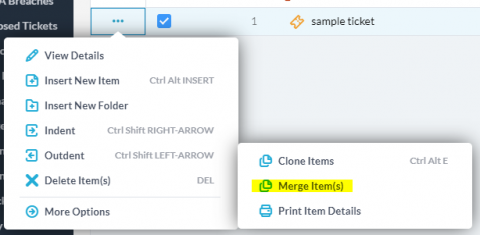
The August Update to OneDesk is out and has a few new exciting features that you have been asking for. This post covers one of those features: Merging Tickets.


The August Update to OneDesk is out and has a few new exciting features that you have been asking for. This post covers one of those features: Merging Tickets.
A modern high-capacity building is a blend of technology and structure. It is why developers have to work with heating and cooling system experts to guarantee optimum living conditions for residents. To meet expectations, heating and cooling system experts can only rely on the right tools needed for successful collaboration between cross-industry experts who develop the systems and the customers who need the solution.
The retail model is perhaps one of the most commonly adopted business models in existence. From small Mom-and-Pop outlets to the multinational retail chain, each of these businesses must manage their operations well enough to stay in business, and that is often not as easy. Store owners and managers have so much on their plates ranging from chunks of inventory management tasks to bits of customer support issues.
Maintenance is a concept that is common to nearly every industry and business. While regular maintenance can be driven by the company itself, often times businesses rely on their customers to come forward with any degradations that they come up against. Audiovisual companies are no exception. One such company came to us with a set of requirements for their maintenance and upkeep of equipment that they needed to track and manage. In order to do this, we agreed that a ticketing system was the way to go.
Last week we release the latest update to OneDesk. The big feature in this release is the Knowledgebase, and I have written a couple of articles covering it here and here. We also added a few smaller features which I would like to cover as well.
We just released our new Knowledge Base feature in OneDesk to allow you to provide a place for your customers to search and find answers to their questions. There are many features to the Knowledge Base (and more to come) which I cover in more detail in another post. If you sign up for OneDesk today, you will already have the Knowledge Base enabled so you can jump right to that article to learn more about it.
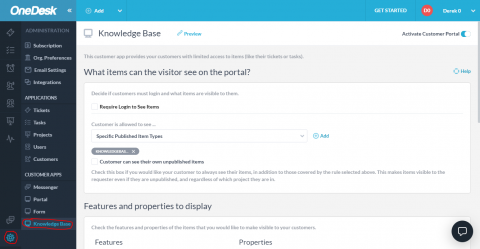
The OneDesk Knowledge Base is a ‘customer app’ that you can add to your website widget or place directly on your website, to provide a place for your customers to find answers to their questions. It works by allowing you to create items (which we will call “KB articles”) and publish them to this app.
Technology is revolutionizing every aspect of our lives, and the health sector is not an exception. The industry is actively blending newer life-saving technologies on an ongoing basis. Research indicates that about 86% of healthcare service providers and related organizations are already using artificial intelligence, and the numbers continue to grow.
Businesses specialized in development, deployment, and maintenance of software products are currently experiencing a commendable market boom. It is undoubtedly the prime of the industry. In this age of technological advancement, the software is the soul of every computing device you can think of, and it is the core of any emerging technology from artificial intelligence to internet of things and robotics. We can only conclude that the outlook on the industry’s growth is on the positive side.