Teams | Collaboration | Customer Service | Project Management

Understanding Projects, Portfolios, Folders, & Items

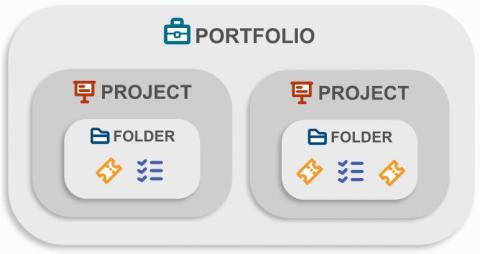
OneDesk uses different naming conventions to refer to the things inside of OneDesk. There are a few main objects that OneDesk can contain: portfolios, folders, projects, and items. However, you can ONLY share projects and items, not portfolios and folders. Portfolios and folders create structure. Portfolios group projects while folders group items. Projects group folders and items together.

How a Wire Manufacturer uses OneDesk to capture requests and manage projects

A lot of companies, and their underlying departments, face growing pains as they build on their success and establish themselves as true organizations. As product offerings and capabilities expand, departments and teams start to field wider ranges of requests for work, and this can lead to people specializing in order to build efficiency. Sometimes these requests can come from other teams at the same company even.

How an Internal Marketing Team uses OneDesk to serve 48 Hearing Clinics

When a company first starts out, the team is often cross-functional in its nature. This overlapping of responsibilities allows a company to be scrappy and grow quickly without too much overhead. Over time and through this period of growth, companies start to expand and develop more definition in terms of its different internal functions: sales, marketing, customer experience, operations, finances, and more.

How a MNC uses OneDesk for ERP

ERP – or enterprise resource planning – is a term thrown around fairly often when discussing the operations of a business. The focus of ERP is to improve efficiency by seeking insight into where resources are allocated and improving how they are being utilized. To develop a full picture of where resourcing is currently, analysis and planning needs to be done across verticals – from finance to human resources, from distribution to procurement.

How an ERP IT & Dev Agency uses OneDesk for its workflows

Agencies are all about their clients and customers. Providing good service and support is the foundation of the experience of working with an agency. This puts pressure on the agencies to be on top of their work, no matter how many customers they have and how much work is being requested of them. At times, agency work can be chaotic, and so having some solid software and tooling can make a world of difference in terms of management.

How an ISP uses OneDesk to manage its workflows

Any company that provides a service has a number of routine workflows and procedures that they utilize to support their customers. An internet service provider (ISP) is no exception—everything from setup to maintenance to billing can be encapsulated as a workflow that is refined over time in order to provide the best experience for the customer. While these workflows are being improved and iterated on, it can be challenging to apply the workflows to multiple customers without a proper setup.