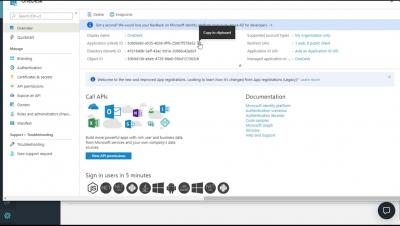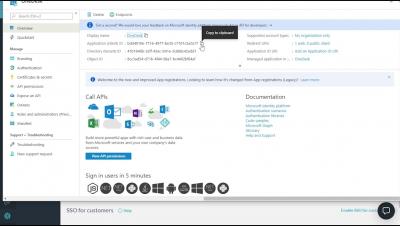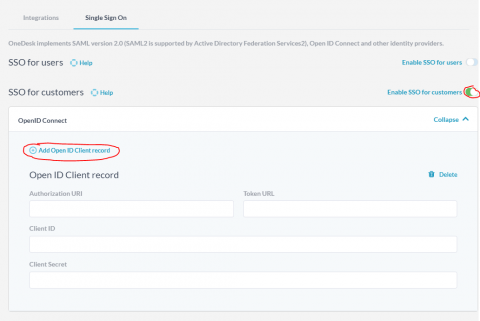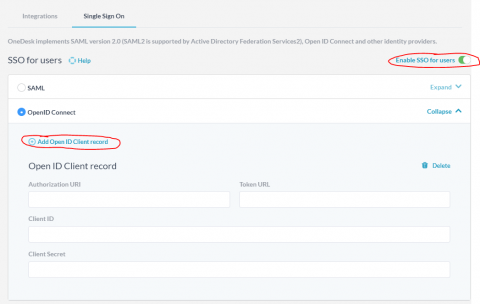
You may want to have your customers be automatically logged in to your OneDesk customer apps whenever they are on your site and authenticated with your own systems. This post will show you how to set that up using Azure as the identity provider, but the same idea will apply for any provider that supports OpenID Connect.
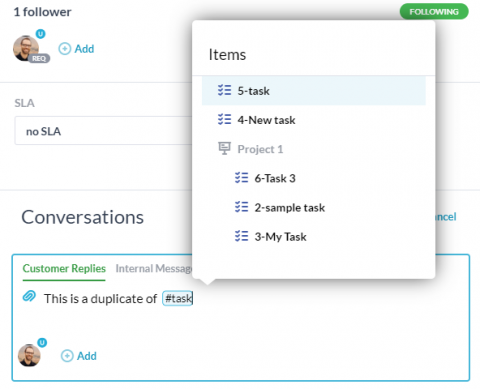
In OneDesk you will find yourself frequently discussing tickets and tasks. Sometimes this conversation will be on the actual item, but often you will want to refer to a different one. For these cases OneDesk has a great feature which allows you to quickly create a link when inside a conversation.
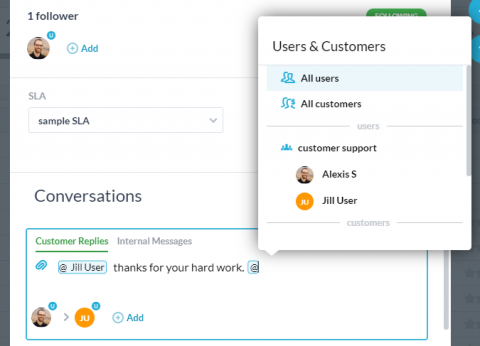
The December 2019 release of OneDesk added the ability to use the @ symbol in conversations in OneDesk. Most of you will be familiar with this type of method to message people from other apps. This article will cover some of the details of how it works in OneDesk.
The December release of OneDesk is a big one with a list of significant improvements and new features. It went live on December 10th 2019.
Across the worlds of CRM, project management, and support work, there are a multitude of different tools and software that can be used. In some cases where departments are large enough to support integrating their tools with other team’s tools, it’s not a concern using so many different tools to get work done. However, there are many companies that require close communication between teams that are hindered by their usage of separate, disparate tools.
When setting up meetings, pitches, training, and events, the ideal manager makes a special effort to deliver an immersive experience by evaluating, tracking, and evaluating the audience’s level of engagement to achieve the best outcome of the event possible. After all, a high level of user engagement is perhaps the most subjective measure of a successful event. Certain companies are specialized in developing event technology geared towards refining the conventions of audience engagement.
If your job is to manage an end-user or customer support organization, one thing you really need a handle on is the flow of support emails into, and out of, your department. You need to be sure that you are capturing all incoming tickets, as well as all responses on those tickets. You also need to be able to audit all outgoing email sent by your team and the messages on conversations they are having with customers.